








About Sprout & Soil:
Sprout & Soil is a farming-focused Minecraft mod that adds a large variety of new crops, plants, and ingredients.
Players can grow tomatoes, berries, and other crops, then craft exciting new food recipes. The mod enhances farming,
cooking, and exploration, giving survival worlds more variety, creativity, and a sense of progression.
Why Choose Sprout & Soil?
- Expand your farming possibilities with dozens of unique crops.
- Unlock new crafting and cooking mechanics.
- Enjoy visually appealing crops and plants with high-quality textures.
- Benefit from a mod that receives frequent updates and community feedback.
 Support NightBeam Studio on Ko-Fi to help fund mod development and updates.

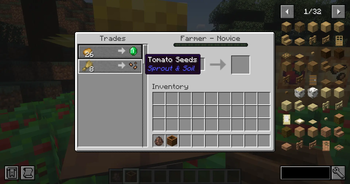
- New Tomato Plant & Seeds: Grow fresh tomato plants and use them in recipes.
- Expanded Farming Content: Additional crops, plants, and ingredients are coming soon.
- New Foods & Recipes: Craft flavorful meals from your harvest.
- Ongoing Updates: The mod receives regular updates adding new farming mechanics and items.
Roadmap & Future Updates:
- New crops like peppers, melons, and exotic fruits.
- Farm animals and new livestock mechanics.
- Seasonal crops and dynamic farming events.
- Cooking expansions with special recipes and effects.

⏩ Supported Versions: 1.20.1
⏩ Requires: NeoForge or Forge
⏩ Also Requires: JAUMl Library
⏩ How to Install: Drop the mod .jar file into your Minecraft mods folder and launch with the correct Forge/NeoForge version.
External resources
Project members

NightBeam Studio

NAIZO
Owner