
Hide Your Server IP (HYSI)
Built for streamers, content creators and server owners who want to keep their server IP private.
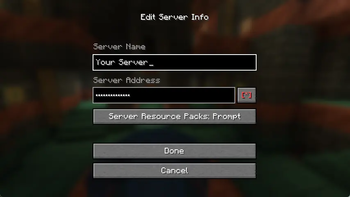
HYSI masks server IP addresses with bullet points (•••••••••) in every Minecraft multiplayer screen. A single click reveals or hides the address — just like a password field in a browser.
Why?
Accidentally leaking a server IP during a live stream can expose the server to DDoS attacks or unwanted visitors. With HYSI installed the IP is hidden by default. You reveal it intentionally, never by accident.
How it works
| Screen | Behaviour |
|---|---|
| Direct Connect | IP field starts masked — click [*] to reveal |
| Add Server | IP field starts masked — click [*] to reveal |
| Edit Server | IP field starts masked — click [*] to reveal |
- [*] (red) → IP is hidden
- [O] (green) → IP is visible
Download
Grab the latest release from the Releases page.
Client-side only — install only on your own game client, not on the server.
License
Copyright (c) 2025 exnfachjan. All rights reserved.
Made with ❤️ by exnfachjan
