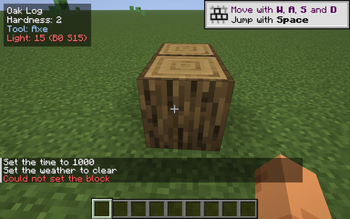

Block Target Info
A small, always-on HUD overlay that tells you what you're looking at. Aim at any solid block and a tidy 4-line readout appears in the corner:
- Block name — the same name F3 would show, in clean English (e.g. "Oak Log", "Diamond Ore", "Obsidian").
- Hardness — how long it takes to mine, colour-coded so you can tell a 0.5-hardness shrub from a 50-hardness obsidian block at a glance.
- Tool — pickaxe / axe / shovel / hoe / hand, so you don't have to remember which tool drops what.
- Light level — the light on the face you're aiming at, with separate block-light and sky-light readouts (B / S). Goes amber under 8, red at 0, so you can spot spawnable surfaces while you build.
Pure client-side, drop-in, works on any server. No mixins, no gameplay changes.
Why?
F3 is huge and ugly and floods your screen with debug info. Other HUD mods focus on coordinates or biomes. This one does one thing: tells you about the block you're pointing at. Useful while building, mining, or just learning the game.
Controls & config
- Default toggle key: B. Press at any time to show/hide the readout.
- Config file:
<minecraft>/config/blocktarget.json. Choose the corner, which lines to show, the toggle key, and the max distance.
Compatibility
- Minecraft: 1.21.8 – 1.21.10 (single JAR).
- Loader: Fabric.
- Side: client-only — no need to install on the server.
Credits
Original mod, MIT licence. Issues / PRs welcome.
Project members

kvapilvaclav0
Member
Technical information
License
MIT
Client side
required
Server side
unsupported
Project ID